

Fill the Advanced Filter dialog box options to fulfill your requirements.
You work as an Office Assistant for Peach Tree Inc. You have created a report in a workbook using
Microsoft Excel 2010. The report includes a worksheet that contains sales data of the company. You
want to use complex criteria to filter the list. For testing, you have inserted criteria rows in the sheet.
The fragment of the worksheet is shown below: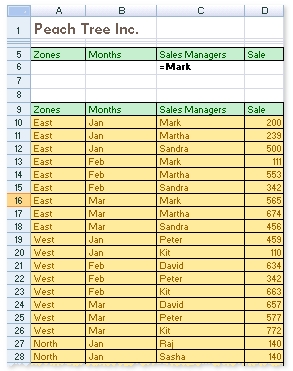
The list range is defined as A9:D44. For testing, you want to filter the list for all the records of Mark.
You want to ensure that the filtered list does not provide duplicate rows. You also want to display
the filtered list at a new location at the G9 cell position. You open the Advanced Filter dialog box by
clicking the Advance option in the Sort & Filter group on the Data tab.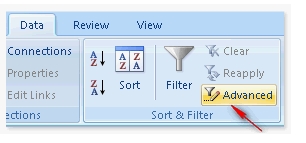
Fill the Advanced Filter dialog box options to fulfill your requirements.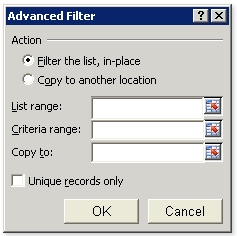
Which option will she use to accomplish the task?
Sandra has created a report in Excel 2010. Her manager needs that report in tab delimited text
format. Sandra has to export the report in the required format. Which option will she use to
accomplish the task?
Which of the following hot keys will you use to accomplish the task?
You are creating a report in Excel 2010. You have recently created a similar report that can help you
in creating the current report. You want to display a list of the last twenty workbook files most
recently opened for editing in Excel. Which of the following hot keys will you use to accomplish the
task?
Mark the option that you will choose to accomplish the task.
You work as an Office Assistant for Pecuniary Inc. You have created a report in a workbook in Excel
2010. You want to quickly format headings and titles in the workbook. Mark the option that you will
choose to accomplish the task.
Which of the following steps will you take to accomplish the task?
You are creating a worksheet in Excel 2010. You have entered data value as shown in the image given below:
You want to copy formatting of first two rows to all the rows. Which of the following steps will you
take to accomplish the task?
Each correct answer represents a complete solution. Choose two.
Which of the following steps will she take to accomplish the task?
Sasha has created a worksheet using Excel 2010. She needs to print the worksheet. She wants to
print top two rows in each page. Which of the following steps will she take to accomplish the task?
Mark the option he will choose to accomplish this task.
Sam needs to manipulate default Excel settings. Mark the option he will choose to accomplish this task.
Which of the following steps will you take to accomplish the task?
You are creating a worksheet in Excel 2010. You have entered data as shown in the image below:
You have merged A1 and B1 cells. You want to align text in the merged cell to appear as shown in
the image below:
Which of the following steps will you take to accomplish the task?
Each correct answer represents a part of the solution. Choose two.
You need to change that in the format given below: Which of the following steps will you take to accomplish
You are working on a worksheet in Excel 2010. You have entered few data in the sheet as shown below:
You need to change that in the format given below:
Which of the following steps will you take to accomplish the task?
Which of the following hot key combinations will you use for it?
You create a report in Excel 2010. You need to display the Save & Send panel in the Backstage View
where you can send the current workbook as an e-mail attachment, save it in a new file format.
Which of the following hot key combinations will you use for it?